














Vice Coast Overdrive
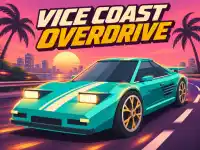
Vice Coast Overdrive puts you behind the wheel of the turquoise Sunrunner across six timed highway sprints. Race the waterfront and causeway, bank close to traffic for nitro, and reach checkpoints to keep the clock alive.
Gameplay Focus
Each sprint runs on a countdown clock. Checkpoints add seconds as you weave past cargo vans on the waterfront and dodge patrol cars on the causeway. Near misses with traffic refill nitro, while collisions drain speed and damage the Sunrunner.
What Stands Out
As a Racing Games pick, Vice Coast Overdrive blends 3D racing with risk and reward. Tight traffic turns every close pass into fuel for your nitro bar, and the damage system keeps runs tense. Three hits end the run, so clean lines matter.
Helpful Tips
Thread gaps between cargo vans to build nitro, then spend it on open stretches. Give patrol cars room on the causeway. Brake early for sharp corrections and protect the Sunrunner from a third hit.
FAQ
How do checkpoints affect the clock?
Reaching a checkpoint adds seconds to your remaining time. Each one extends the run, so pushing forward through traffic is the main way to stay in Vice Coast Overdrive.
What happens when you hit traffic?
A collision costs speed and damages your car. The turquoise Sunrunner takes damage on every hit, and a third hit ends the run outright.
How does nitro refill in this 3D racing game?
Passing close to traffic refills your nitro. Near misses with cargo vans and patrol cars build the bar, giving you a burst of speed when you need it.
How do I steer and accelerate?
Use A and D or the arrow keys to steer, W or the up arrow to accelerate, and S or the down arrow to brake. Hold Shift or Space for nitro, and press P or Esc to pause or resume.
About this game
- Supported devices
- Desktop
- Genre
- Racing Games
- Release date
- 27 November 2026
- Latest update
- 27 November 2026
- Rating
- No ratings yet
Offroad Cycle 3D Racing Simulator
Xtreme Racing Car Stunts Simulator 2022
Monster Truck Offroad 2

Police Car Stunt Challenge
Sprunki Drift Multiplayer

Night Racing
Super Zombie Driving
Chipi Chipi Chapa Chapa Cat Highway Racing
Scooter Touchgrind Tricks 3D

Crazy Traffick Racing 2026

Labubu Auto Adventure

Truck Simulation

Sky Bus Mega Ramp Drive
Bus School Park Driver

Best Emergency Ambulance Rescue Drive Sim
18 wheeler truck driving cargo
City Car Racing Simulator 2021 - Simulation
Funny Mad Racing
Ramp race
Taxi Simulator 2019

Mafia Driver Vice City Crime
Low poly car racing
Car Racing Fever
Sportbike Drive